
M:FLEET by CARDESS
Inspect, value and manage every vehicle. In the office, in the yard, on the road.
M:FLEET connects back office, field teams, drivers and customers in one case. Guided photos, AI damage detection, repair costs, bookings and reports. Configured to your process.
Two apps. FLEET Expert serves the back office on desktop and tablet. The FLEET App serves field teams, drivers and customers. It installs from the browser and works offline.
M:FLEET in practice
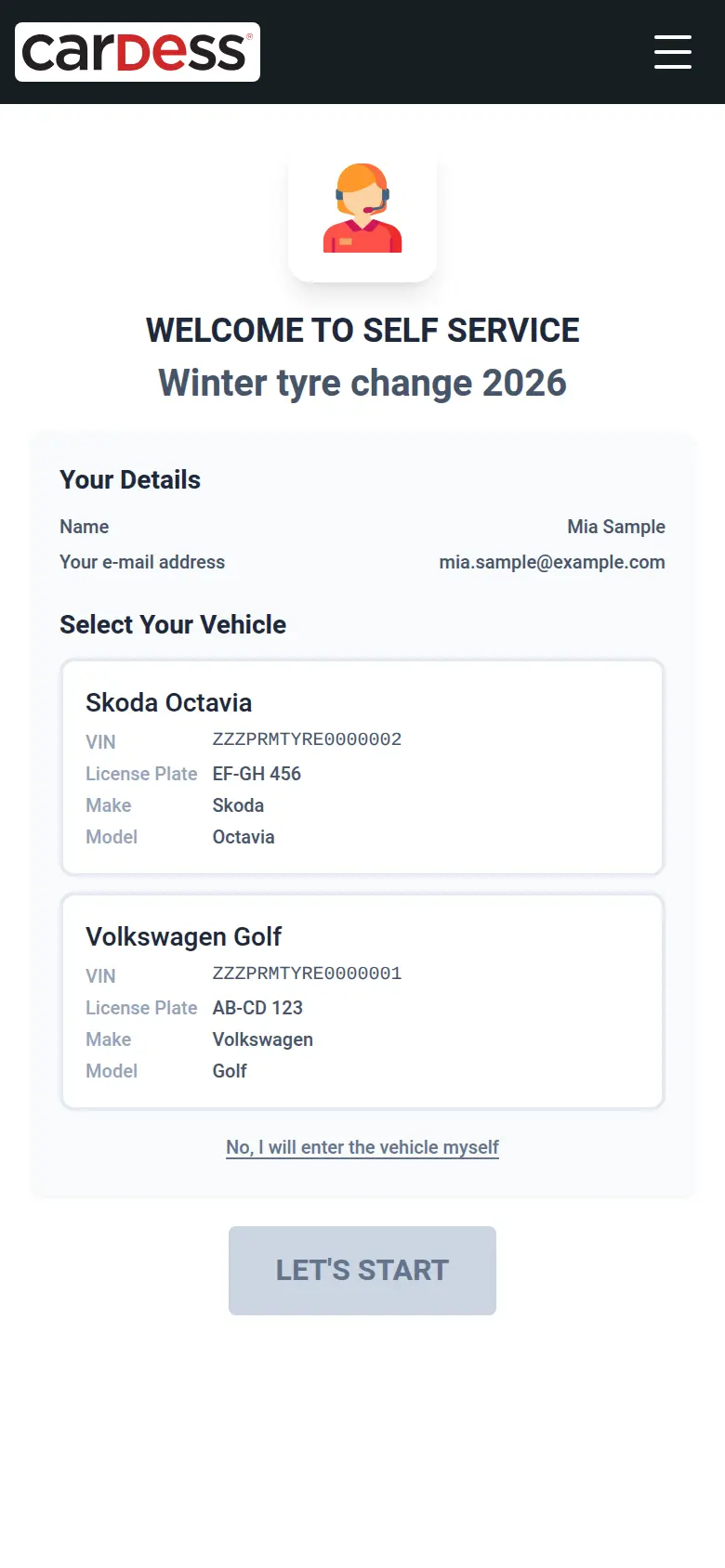
Tyre season
Before the season, the workshop sends each existing customer a personal link with their vehicle already filled in. The customer books the tyre change in about a minute, with no phone call.
See how tyre season works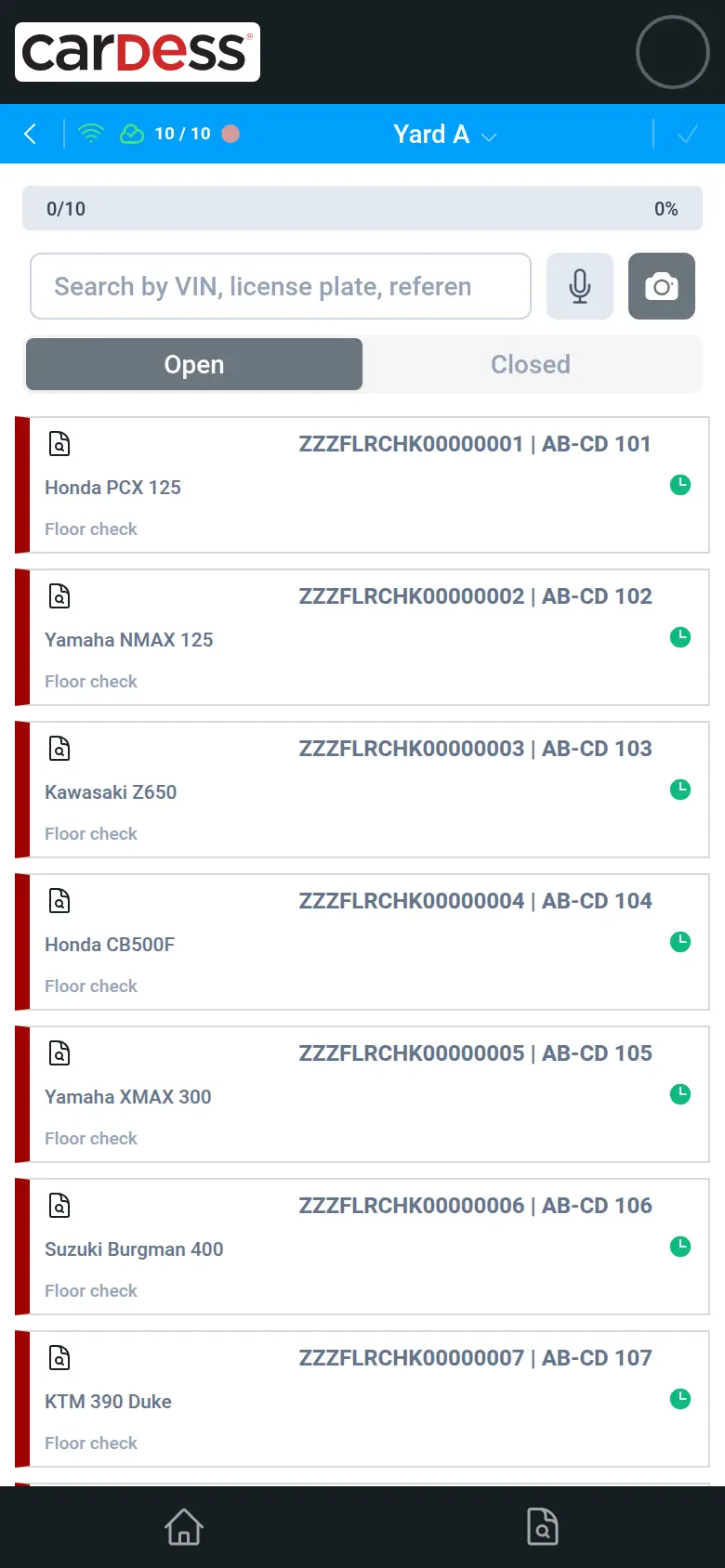
Floor check
On audit day, auditors walk the yard with a phone and open vehicle after vehicle from the audit list. Each check aims for under a minute, and the manager sees the progress and a result per vehicle.
See how a floor check works
Why M:FLEET
Inspect any vehicle in minutes, by anyone.
Guided capture walks anyone through every photo and check. It works offline. A remote expert can join by live video.
Scanner and AI do the first pass, your experts sign off.
Instavalo drive-through scans and AI damage detection land on the case. Each finding shows a confidence level. Your team accepts, edits or rejects it. Every decision is traceable.
From damage to a priced repair in one flow.
Repair costs are grounded in real prices. DAT valuation and DAT MyClaim are built in. Diminished value is suggested. A branded report takes one click.
Run every campaign: technical, tyre change, seasonal service.
Technical campaigns carry a severity level. Tyre-change and service invitations go out in waves. Customers book, change or cancel online. You see who opened, clicked and booked.
Plugs into the tools you already use.
Instavalo, DAT, Zendesk and Microsoft Entra ID are connected. So are e-mail, SMS and remarketing partners. An open API with webhooks covers the rest. Your team keeps working in M:FLEET.
Your process, at any scale. Configured, not coded.
Case types, steps, statuses and automation are set per location. Import thousands of vehicles. Run audits offline. Choose a shared or dedicated instance.
All M:FLEET features
Every feature, grouped by what you want to get done. Open a group to see its features.
Case intake and creation
- Create a case for a vehicle, a customer and the services ordered. A guided multi-step form leads the way. Form blocks are configured per case type.
- One search box finds contacts and vehicles at once. It shows each customer's vehicles. Vehicle, place and contact are filled in automatically. Search by licence plate when creating a case.
- Start a case from any vehicle. Link it to the case it follows on from. Pre-fill it from that predecessor.
- Create or choose an audit or order while creating the case.
- Copy a case with its damages, images, checks, tyres and contacts. Copy it into another case type or another location.
- Follow-up cases stay inside the same process. This includes hand-over to a remote expert appraisal.
- Move a case or a vehicle to another location. Choose the status and comment on both sides.
- Case and audit numbers are short, searchable and sequential per location. Change the case type later.
- Internal-note templates and a choice of which contacts get notified.
- Capture new places and contacts inline. Addresses fill in automatically, or pick from the directory.
- Self-service links pre-load the vehicle. A driver or customer then starts the case themselves.
Guided inspection and photo capture (FLEET App)
- Identify the vehicle by scanning the VIN or licence plate with the camera. Or use voice, or search by VIN, last six digits or reference.
- Drivers pick their vehicle from their own list. Any other vehicle can be entered by hand.
- Pick the damaged part on a car or truck diagram. The diagram adapts to the body type. Guided damage steps follow.
- Mark the damage on the photo while taking it. Add a comment. Add more photos to a damage later.
- AI reads each photo and suggests severity, value and comment. Accept or dismiss each suggestion inline. Continuous capture can apply suggestions automatically.
- Separate damage types for dents, bumps, curb damage and wear. Sizes are in centimetres.
- Step-by-step checklists with required checks. Progress is shown per tab.
- Fuel type, superstructure and registration date are captured in the flow. Known data pre-fills them.
- Instant vehicle valuation by the user themselves, also without an account.
- Drivers see their vehicles, contract dates, mileage ranges and documents. The insurance card downloads in one tap.
Expert inspection and car check (FLEET Expert)
- QuickCheck is a fast, touch-friendly photo inspection canvas. It runs on desktop, tablet and phone. New check types are added by configuration.
- One damage tool draws several damage boxes per photo. Move and resize them. Original and marked-up photos stay together.
- Photo editing: background removal, brightness, contrast and pixelation for privacy. Navigate by keyboard or swipe, and pinch to zoom.
- Tyres: tread-depth diagrams and summer and winter thresholds per location. Unmounted tyres, tyre model and one-by-one entry. A tyre lookup tool is built in.
- Car, truck and body-type-specific diagrams and overlays.
- Live sync between devices lets two people work on the same check. Uploads in progress stay with the case. Failed uploads retry.
- Images are grouped by source in a timeline. One preview works everywhere. Drag to reorder, or download all as a zip.
AI and scanner integration
- AI damage detection shows on the photo with confidence and review state. Accept findings one by one or auto-accept them. AI walkaround covers the whole vehicle.
- Every AI finding keeps its verdict: accepted, edited or rejected. It also keeps who decided. That makes the human sign-off auditable.
- Instavalo drive-through scanner integration, set per location. One review dialog shows the case next to the scan. Items are pre-ticked and reviewed one by one. This covers tyres, photos by side and part, and vehicle data.
- A banner shows when a scan is waiting. A hover preview shows what it holds.
- Scanner photo gallery with tags: plate, leading, proof and AI. Download in full resolution. Underbody images, tyre and condition reports come attached as files.
- External damage vocabularies are mapped to your repair services and prices. Anything unmapped is flagged, never lost.
- VIN recognition and background removal run on the server. No keys reach the browser.
Valuation, repair cost and claims
- Calculations tab with damage rows, repair methods and services from your catalogue. Totals show net, gross and VAT.
- Repair-cost estimator with price ranges grounded in real data. Ranges narrow to brand and body type.
- Diminished-value suggestion on damage rows.
- Predictive vehicle valuation with a forecast. The case list shows paid-service status and average values. DAT and Autofokus24 market values sit side by side.
- DAT identifies the vehicle by VIN. Make, model, equipment and technical data are filled in.
- Round trip to DAT MyClaim. Damages go out as repair positions. The calculated prices come back onto each damage.
- Remarketing hand-over to carsale24 auctions straight from the case.
- Customer prices and margins.
- Admin-managed vehicle part catalogue per body type.
Reports, documents and sharing
- Branded condition reports, appraisals and contract documents from editable templates. Templates are set per location and can be copied to new ones.
- Online case report with a vehicle diagram. It shows confirmed, AI-flagged and visually checked damage. Full-size pictures are included. The one-click PDF matches the screen.
- Compare two reports side by side with aligned sections, photos and damages.
- Share a case or audit by public link, sign-in link or WhatsApp. Shared files open without sign-in.
- Official PDF forms, such as insurance cards, fill in from case and contract data.
- Configurable exports: choose columns and sorting. Split by equipment, or export everything regardless of filter.
- Structured case export (data, attachments, signatures) for downstream systems.
Process configuration and automation
- Case types (contexts) decide the workflow, steps, checks and statuses. It is configuration, not code.
- Step-based processes: vehicle, services, scheduling, car check, damage review, summary, signatures, notifications.
- Configurable statuses per location, including Scheduled, No-show and Exported. Vehicle statuses support backdating and history.
- Event rules fire on status change. They send mails, create cases or groups and call webhooks. Preview which rules will fire before confirming. The full rule history is kept.
- Automatic status e-mails with preview and attachments. Upload links let recipients add documents.
- Role-specific views for inspectors, experts and back office.
Scheduling and online booking
- Planning calendar with month, week and day views. The week view follows opening hours and shows capacity lanes. Filter by inspector, expert and case type. Reschedule by click.
- Capacity and time-slot management with opening hours, holidays and break handling.
- Customers book online. They choose services, with prices including VAT, and a slot. A summary and a calendar entry with address and services follow.
- Customers change or cancel from the confirmation mail until the change deadline. Cancelling frees the slot.
- Status moves automatically from booking to inspection start. No-shows are handled.
Campaigns: technical, tyre change, seasonal service
- Technical campaigns: each campaign is its own case type. Each has a severity level, for example blue, yellow or red. One vehicle can carry several campaigns at once.
- "Is my car affected?" answered by VIN. A Zendesk AI agent looks up the vehicle's open campaigns from live data. Pilot
- Tyre-change and seasonal service campaigns with invitations and reminders. Customers book slot and services online. Each booking is credited to the campaign.
- Campaigns go out in waves you build yourself. Pick recipients without a wave, without a booking or with a delivery error. Split a selection into waves of a set size.
- Every mail carries your location's branding, the customer's greeting and plate. Each has an unsubscribe link. Reminders go only to those who have not booked.
- Tracking per contact and wave: delivered, opened, clicked, unsubscribed, spam reports. See which vehicles are booked. Export with the columns you choose.
- Import a customer list into a campaign. Places, contacts and vehicles are created or updated in one pass.
- Customers change or cancel their campaign appointment from the confirmation mail.
- Notifications by e-mail and SMS, with a sender per location.
- WhatsApp Business messaging with customers. Rolling out
Live collaboration and communication
- Live video inspection with a picture-in-picture expert feed. Switch cameras and see the call timer. Vehicle and tyre tabs are shared during the call.
- Customers request a callback when experts are busy. Dropped calls reconnect. An image collector works for signed-in and anonymous users.
- Real-time case chat with images and files.
- Mail from the case, mail tracking in the history, notification centre.
- Zendesk integration: sign in to Zendesk with your CARDESS account. Vehicle data shows in the ticket sidebar. Help articles and support chat sit inside the app. Tickets appear on the case.
- Live video runs in the browser, no app install needed (Twilio Video).
Audits, orders and bulk work
- Audits and orders group many cases. They are numbered, with status rules, internal notes, export and dashboards.
- Four-step import wizard for cases, vehicles, places and audits. Column mapping comes with suggestions and a preview. Mapping templates are saved.
- Match vehicles by VIN, plate or your own reference. No duplicates are created. One file can span locations. Addresses are geocoded automatically.
- Bulk actions: change status, schedule, assign users, share or delete. Apply them to a selection or to everything matching a filter.
- Offline audits of thousands of vehicles in the FLEET App. Downloads are compact and readiness shows per row.
Vehicles, contracts, places and contacts
- Vehicle record with inspection overview, price, maintenance data and superstructure. It also holds images from every case, external references, drivers and notes.
- Contracts (leasing, insurance), linked and replaced explicitly, with printable forms.
- Places and contacts with types, addresses, a map and GPS capture. Counts show linked vehicles and cases.
- Full-text vehicle search over VIN, plate, brand, model, driver and reference.
Lists, dashboards and insights
- Consistent lists with photos per row and header sorting. Server-side filters are remembered per location. Open any row in a new tab.
- Cases & Orders timeline in the FLEET App. Filter by open, completed, overdue, mine, all or unscheduled. Today comes first. Swipe to change status.
- Dashboard widgets: billing per month and vehicles on a map. Defects per area and vehicle type. Status by month and lead times. Click through to the filtered list.
- Boards (Kanban) with photo cards.
Works everywhere
- The FLEET App is an installable web app. It works fully offline. Photos and answers are queued and sync when back online.
- FLEET Expert installs as its own window on tablet and desktop. Controls are touch-sized.
- Built-in knowledge base, location-specific manuals and in-app tips. New features are highlighted.
- German, English and Italian, with per-location wording overrides.
Security and enterprise
- Single sign-on across all CARDESS apps. Sign in with SMS one-time codes or Microsoft Entra ID. Passkeys work in the FLEET App.
- Roles and location-scoped access, including a read-only viewer role. Sensitive data is shown only to entitled roles.
- Device list with remote sign-out, configurable idle logout.
- Personal-data checks marked with retention periods and protected images.
- Open partner API with per-client rate limits. Look up records by your own references. Image links stay stable. Webhooks are included.
- Dedicated instances with separate data, next to the shared platform.
Questions about M:FLEET
- Can drivers and customers do an inspection themselves?
- Yes. The FLEET App guides anyone through the photos and checks, step by step. It identifies the vehicle by camera or voice. It runs in a browser, with nothing to install from an app store.
- Does M:FLEET work without a mobile connection?
- Yes. The FLEET App is an installable web app that works fully offline. Photos and answers are queued and synchronised once the device is back online. This includes audits of thousands of vehicles.
- How does AI damage detection fit into the inspection?
- AI findings and drive-through scans arrive on the case with a confidence level. Your team accepts, edits or rejects each one. Every decision is kept with who made it.
- Which scanners and calculation systems are connected?
- M:FLEET pulls drive-through scans from Instavalo. Damages go to DAT MyClaim. The calculated prices come back onto each damage. DAT and Autofokus24 values show side by side.
- Can we run technical campaigns and tyre-change campaigns?
- Yes. Technical campaigns are case types with a severity level. One vehicle can carry several. Tyre-change and seasonal campaigns go out in waves. Customers book, change or cancel online. You see who opened, clicked and booked.
- Do we need developers to adapt M:FLEET to our process?
- No. Case types, steps, checklists, statuses, automatic mails and webhooks are configured per location. You do it in CARDESS Settings.
- Can we connect our own systems?
- Yes. M:FLEET has an open REST API secured with OAuth 2.0 / OpenID Connect. Event rules send outgoing webhooks. Single sign-on works with Microsoft Entra ID.